CompTIA Security+ Simulation 5

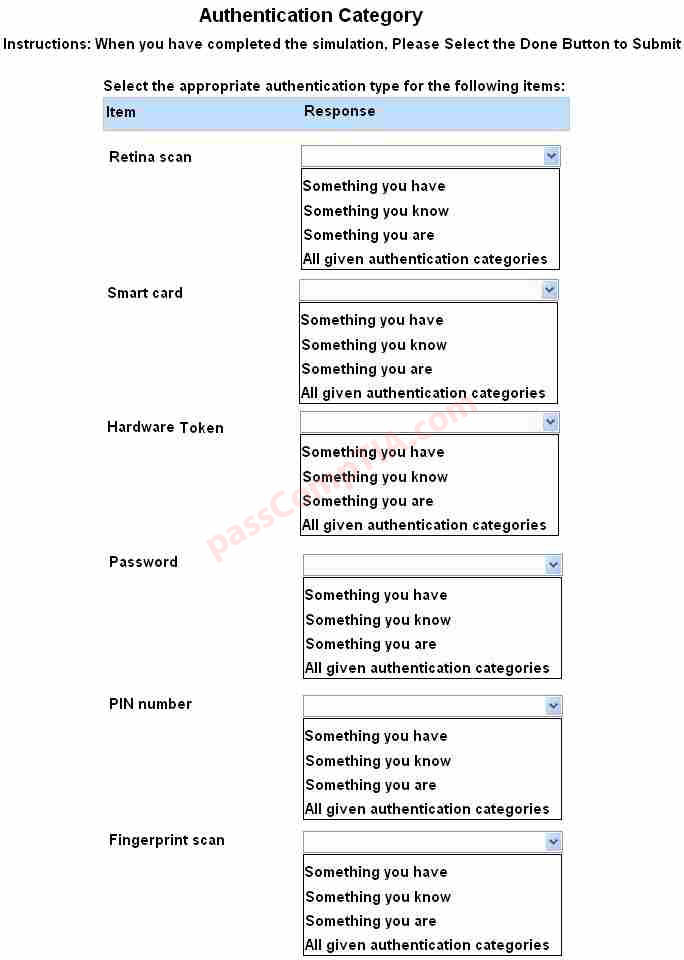
For each of the given items, select the appropriate authentication category from the drop down
choices.

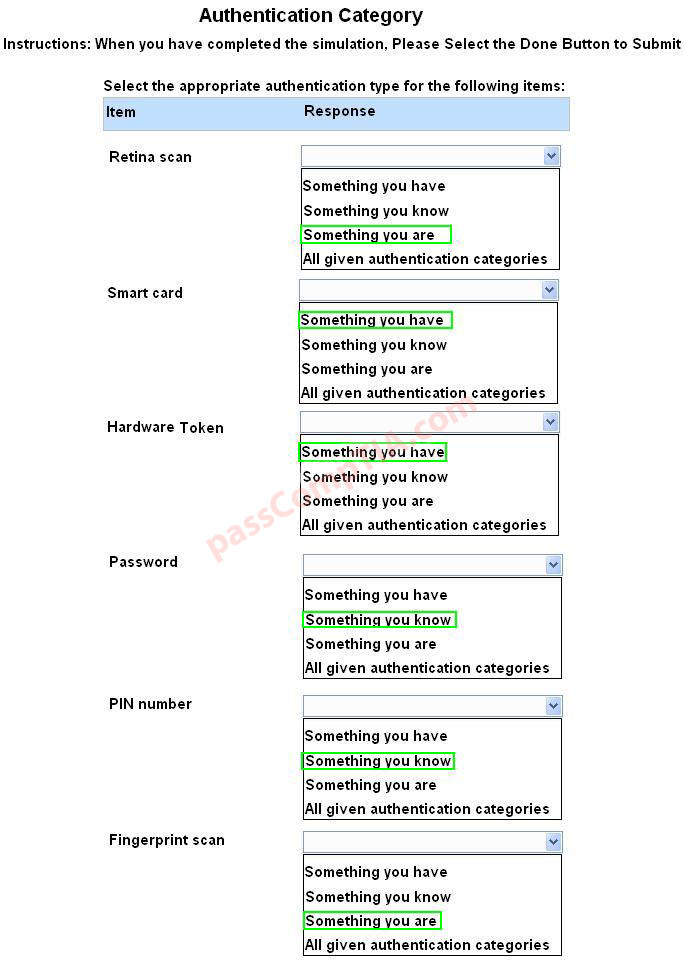
Select the appropriate authentication type for the following items:
Correct Answer:


Something you are includes fingerprints, retina scans, or voice recognition.
Something you have includes smart cards, token devices, or keys.
Something you know includes a passwords, codes, PINs, combinations, or secret phrases.
Somewhere you are includes a physical location s or logical addresses, such as domain name, an
IP address, or a MAC address.
Something you do includes your typing rhythm, a secret handshake, or a private knock.

References:
Stewart, James Michael, CompTIA Security+ Review Guide, Sybex, Indianapolis

CompTIA Security+ Simulation 4

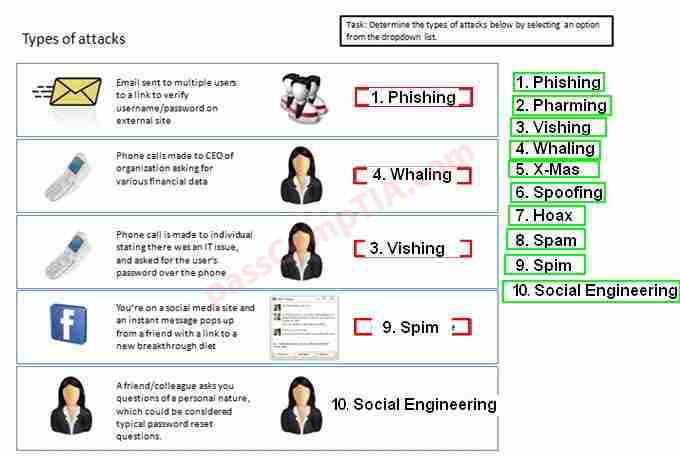
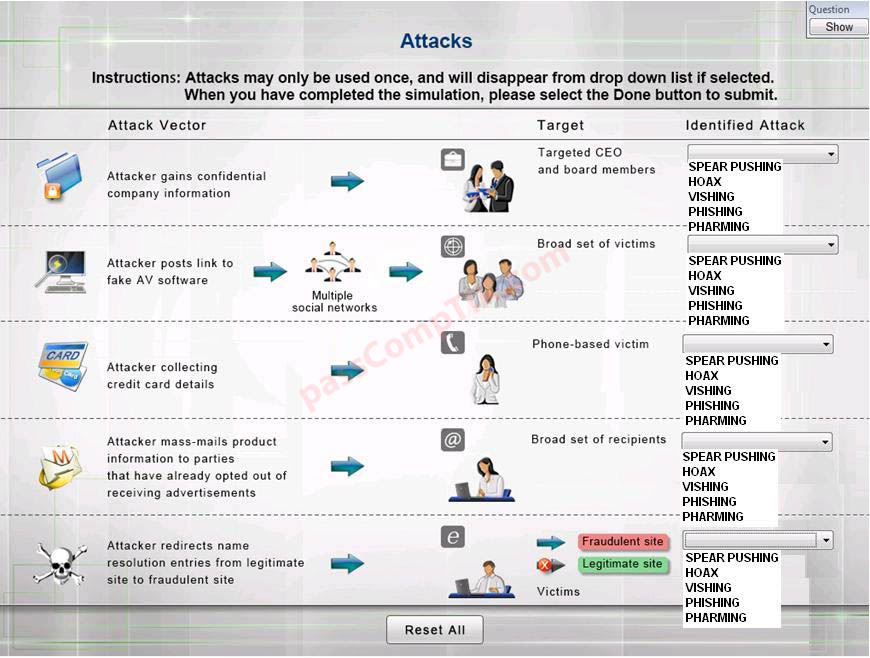
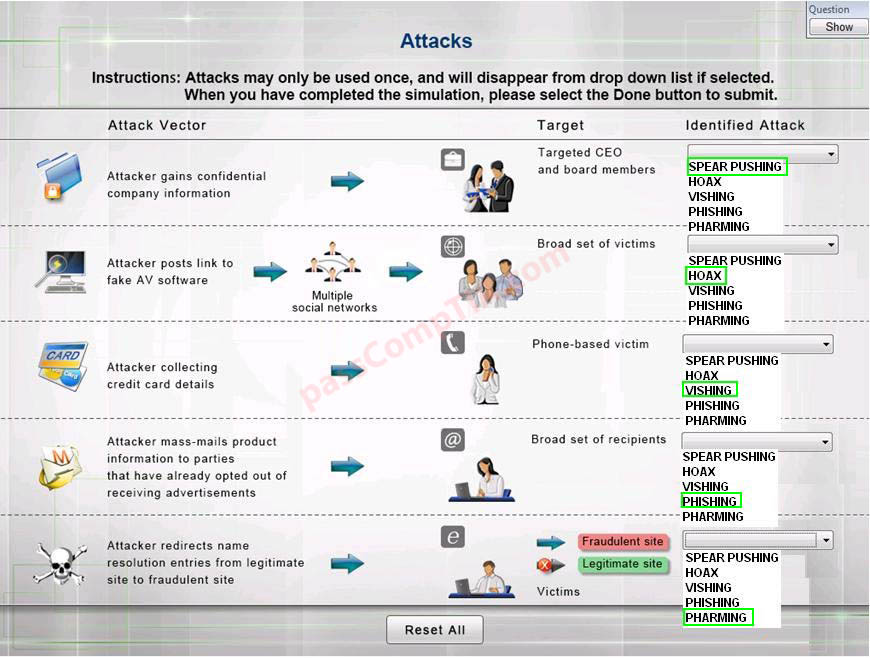
Select the appropriate attack from each drop down list to label the corresponding illustrated attack

Instructions: Attacks may only be used once, and will disappear from drop down list if selected. When you have completed the simulation, please select the Done button to submit.
Correct Answer:


1: Spear phishing is an e-mail spoofing fraud attempt that targets a specific organization, seeking unauthorized access to confidential data. As with the e-mail messages used in regular phishing expeditions, spear phishing messages appear to come from a trusted source. Phishing messages usually appear to come from a large and well-known company or Web site with a broad membership base, such as eBay or PayPal. In the case of spear phishing, however, the apparent source of the e-mail is likely to be an individual within the recipient’s own company and generally someone in a position of authority.

2: The Hoax in this question is designed to make people believe that the fake AV (anti-virus) software is genuine.

3: Vishing is the act of using the telephone in an attempt to scam the user into surrendering private information that will be used for identity theft. The scammer usually pretends to be a legitimate business, and fools the victim into thinking he or she will profit.

4: Phishing is the act of sending an email to a user falsely claiming to be an established legitimate enterprise in an attempt to scam the user into surrendering private information that will be used for identity theft.

Phishing email will direct the user to visit a website where they are asked to update personal information, such as a password, credit card, social security, or bank account numbers, that the legitimate organization already has. The website, however, is bogus and set up only to steal the information the user enters on the page.

5: Similar in nature to e-mail phishing, pharming seeks to obtain personal or private (usually financial related) information through domain spoofing. Rather than being spammed with malicious and mischievous e-mail requests for you to visit spoof Web sites which appear legitimate, pharming ‘poisons’ a DNS server by infusing false information into the DNS server, resulting in a user’s request being redirected elsewhere. Your browser, however will show you are at the correct Web site, which makes pharming a bit more serious and more difficult to detect. Phishing attempts to scam people one at a time with an e-mail while pharming allows the scammers to target large groups of people at one time through domain spoofing.

References:
http://searchsecurity.techtarget.com/definition/spear-phishing
http://www.webopedia.com/TERM/V/vishing.html
http://www.webopedia.com/TERM/P/phishing.html
http://www.webopedia.com/TERM/P/pharming.html

CompTIA Security+ Simulation 3

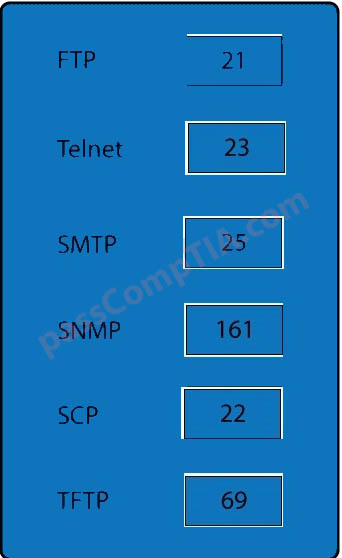
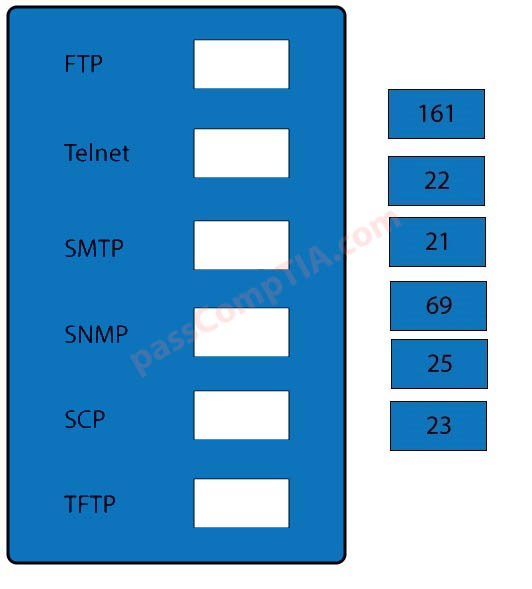
Drag and drop the correct protocol to its default port.
Correct Answer:


FTP uses TCP port 21.
Telnet uses port 23.
SSH uses TCP port 22.

All protocols encrypted by SSH, including SFTP, SHTTP, SCP, SExec, and slogin, also use TCP port 22. Secure Copy Protocol (SCP) is a secure file-transfer facility based on SSH and Remote Copy Protocol (RCP). Secure FTP (SFTP) is a secured alternative to standard File Transfer Protocol (FTP).

SMTP uses TCP port 25.
Port 69 is used by TFTP.
SNMP makes use of UDP ports 161 and 162.

References:
Stewart, James Michael, CompTIA Security+ Review Guide, Sybex, Indianapolis

http://en.wikipedia.org/wiki/List_of_TCP_and_UDP_port_numbers

CompTIA Security+ Simulation 2

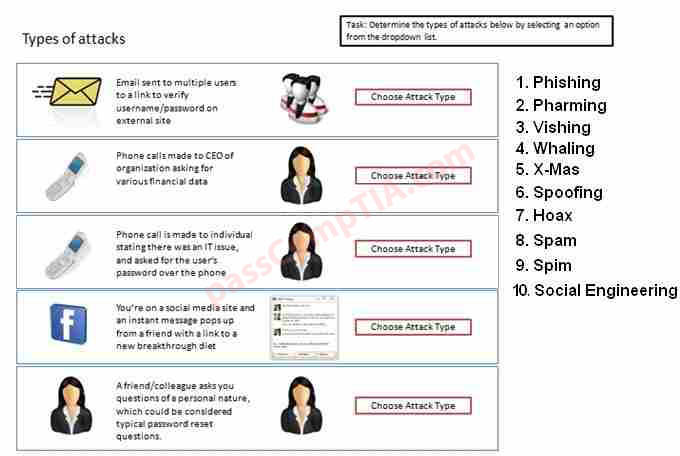
Determine the types of attacks below by selecting an option from the drop and drag list. Determine the types of Attacks from right to specific action.
Correct Answer:

CompTIA Security+ Simulation 1

DRAG DROP
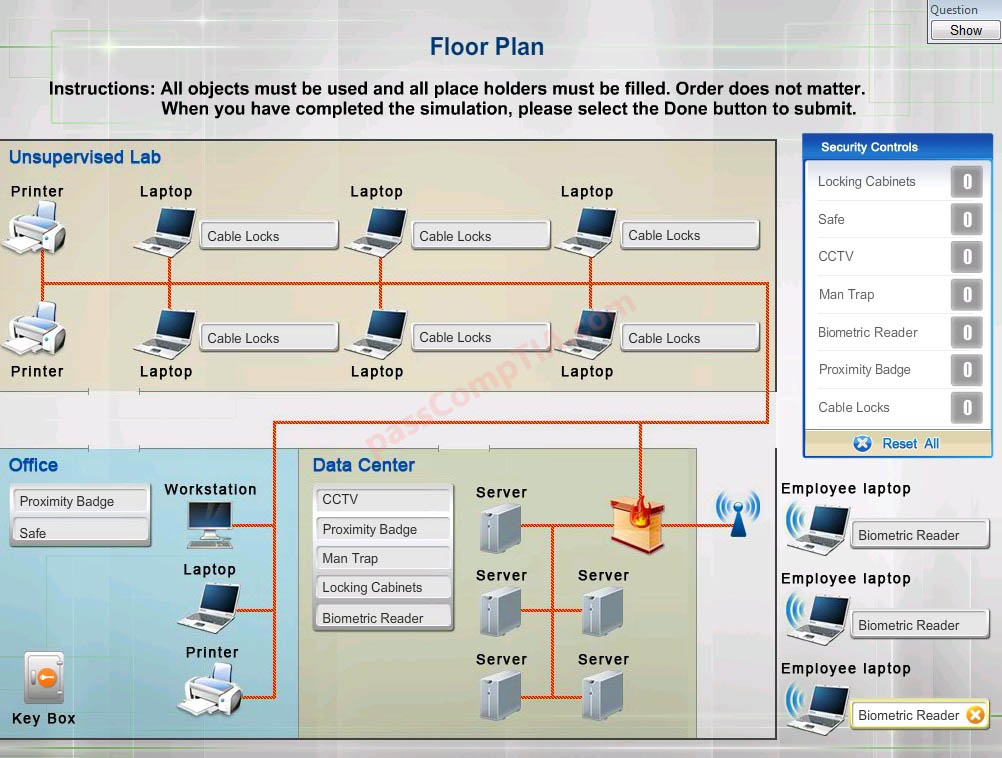
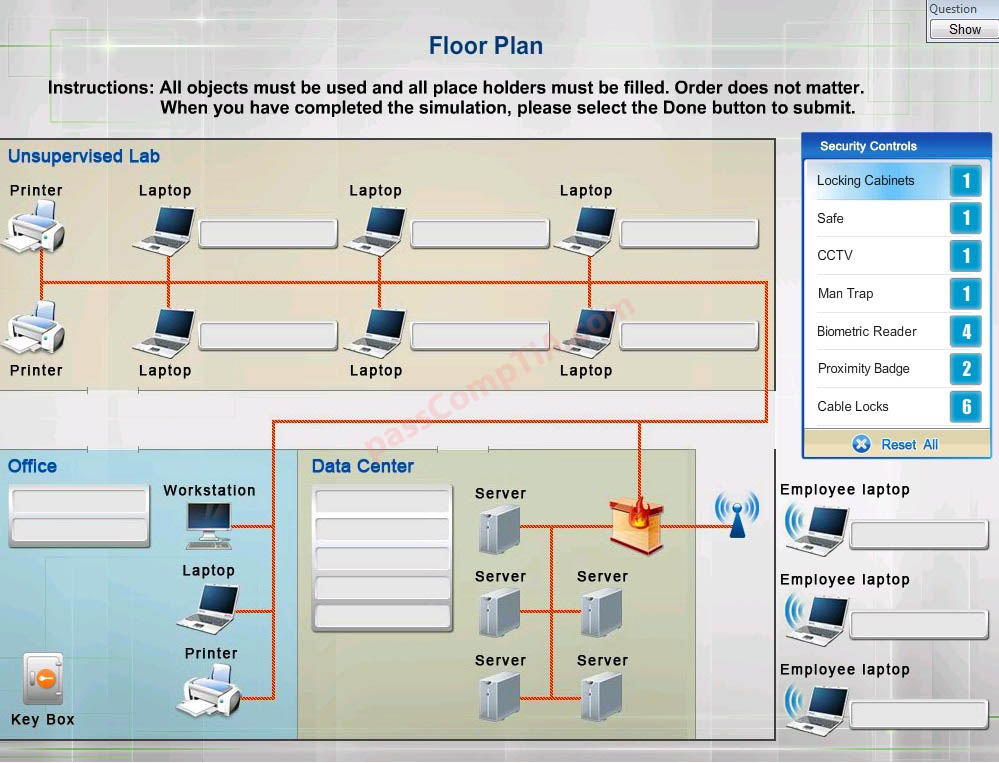
You have been tasked with designing a security plan for your company. Drag and drop the appropriate security controls on the floor plan.

Instructions:All objects must be used and all place holders must be filled. Order does not matter. When you have completed the simulation, please select the Done button to submit.
Correct Answer:


1) Unsecured computer lab – Cable lock, proximity badges, biometric, CCTV, safe, cabinet lock
2) Office work place – safe, proximity, cable lock
3) Datacenter – biometric, proximity, mantrap, cipher lock
4) Offsite computer – cable lock, mantrap, CCTV

Cable locks – Adding a cable lock between a laptop and a desk prevents someone from picking it up and walking away Proximity badge + reader

Safe is a hardware/physical security measure

Mantrap can be used to control access to sensitive areas.

CCTV can be used as video surveillance.

Biometric reader can be used to control and prevent unauthorized access.

Locking cabinets can be used to protect backup media, documentation and other physical
artefacts.

References:
Dulaney, Emmett and Chuck Eastton, CompTIA Security+ Study Guide, 6th Edition, Sybex, Indianapolis,

CompTIA Network+ Question D-6

A company owns four kiosks that are in close proximity within a shopping center. The owner is concerned about someone accessing the internet via the kiosk’s wireless network. Which of the following should be implemented to provide wireless access only to the employees working at the kiosk?

A. Firewall
B. Web filtering
C. MAC filtering
D. Host-based antivirus

Correct Answer: C

CompTIA Network+ Question D-5

A network technician has been asked to make the connections necessary to add video transported via fiber optics to the LAN within a building. Which of the following is the MOST common connector that will be used on the switch to connect the media converter?

A. FDDI
B. Fiber coupler
C. MT-RJ
D. ST

Correct Answer: D

CompTIA Network+ Question D-4

Which of the following network topologies has a central, single point of failure?

A. Ring
B. Star
C. Hybrid
D. Mesh

Correct Answer: B

Explanation:
A Star network is the most common network in use today. Ethernet networks with computers connected to a switch (or a less commonly a hub) form a star network. The switch forms the central component of the star. All network devices connect to the switch. A network switch has a MAC address table which it populates with the MAC address of every device connected to the switch. When the switch receives data on one of its ports from a computer, it looks in the MAC address table to discover which port the destination computer is connected to. The switch then unicasts the data out through the port that the destination computer is connected to. The switch that forms the central component of a star network is a single point of failure. If the switch fails, no computers will be able to communicate with each other.

CompTIA Network+ Question D-2

A network technician receives the following alert from a network device: “High utilizations threshold exceeded on gi1/0/24 : current value 9413587.54” Which of the following is being monitored to trigger the alarm?

A. Speed and duplex mismatch
B. Wireless channel utilization
C. Network device CPU
D. Network device memory
E. Interface link status
Correct Answer: E

Explanation:
This is an error message that indicates that threshold of high utilization of network interface, in this case interface gi1/0/24, has been exceeded. The message has been triggered on the interface link status.
Note: gi1/0 would be a gigabyte interface.